 xOTT
xOTTEvent slots: a step-by-step setup guide
Create stable sports channels, select feeds and accounts, organize competitions and configure recording-safe XMLTV.
On this page
Before you touch the settings
- Open Events, filter to the intended service/account and refresh its catalogue.
- Confirm the account sees the intended competition and can play one currently available event. Check its assigned region/proxy if required.
- Set the operational time zone in Settings → App; keep server time synchronized.
- Decide whether you want one feed per match, multiple team/network feeds, or dedicated team channels. Begin with a small pool.
1. Open the right modal
- Go to Content → Services and find the service.
- Click its Service Outputs action.
- Under Event Slots, enable Enable stable event slots. Do not recreate a working set just to rename its channels.
- Review existing assignments before changing the slot count, rules or output token.
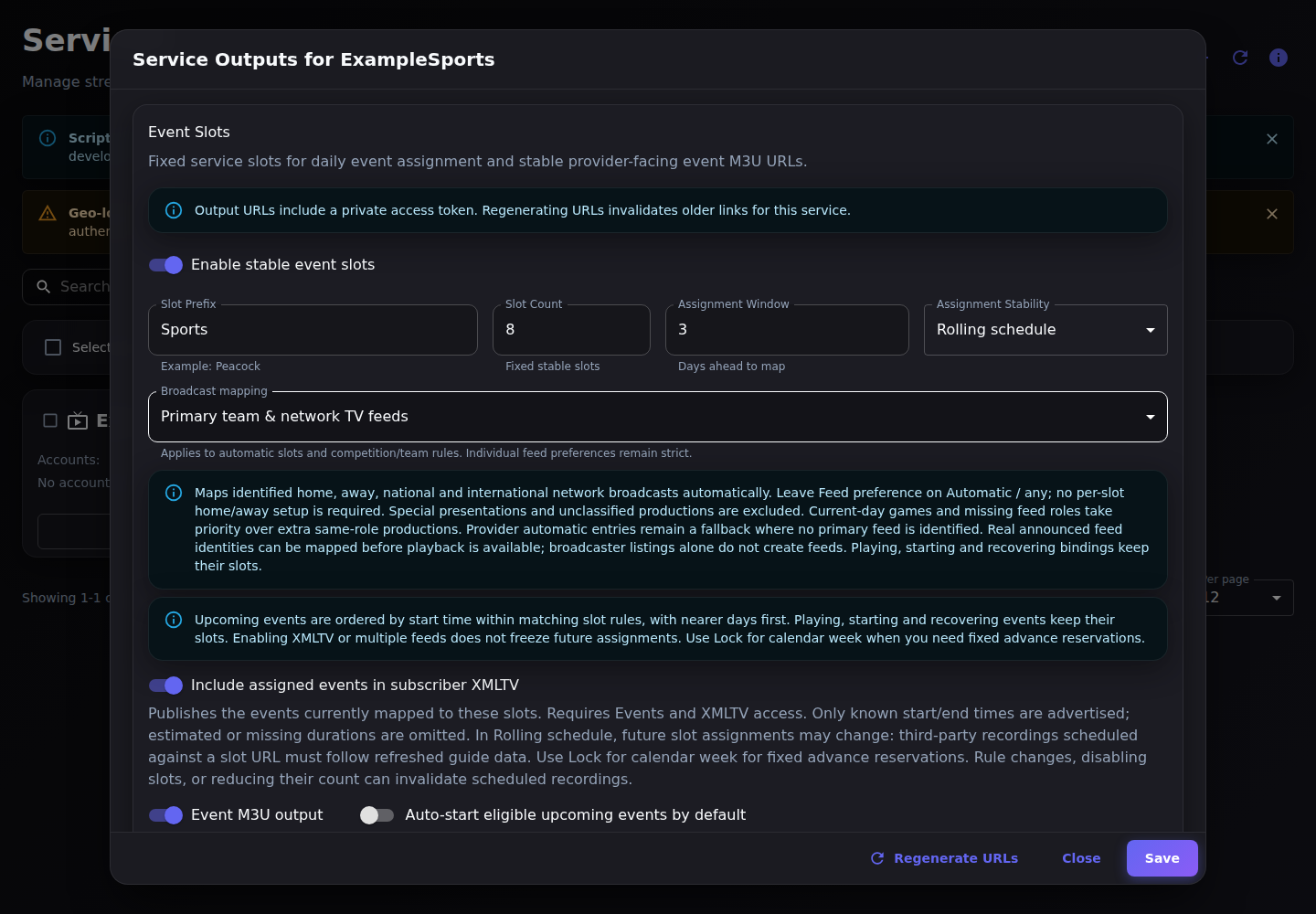
2. Start with eight numbered event channels
| Field | First-test value | What it does |
|---|---|---|
| Slot Prefix | Sports | Provides default output names, such as Sports 01. |
| Slot Count | 8 | Creates eight fixed channel identities; it is not a provider connection allowance. |
| Assignment Window | 3 days | Maps available eligible events within the chosen horizon (1–30 days). |
| Assignment Stability | Rolling schedule | Keeps upcoming dates ordered within equivalent pools; active runtimes remain protected. |
| Broadcast mapping | One feed per game (default) | Starts with one event output per identified game. |
| Event M3U output | On | Enables the service events playlist. |
| Allow duplicate rule matches | Off | Avoids deliberately assigning copies of the same game/broadcast. |
- For each row leave Rule on Auto daily slot and Feed preference on Automatic / any.
- Choose the desired Source account policy; use one known working account for the first test.
- Save. Reopen the modal and inspect the assigned event, source account and any scan diagnostics.
- Copy the generated Event M3U URL from the output section. It is a playlist; open it in a compatible player.
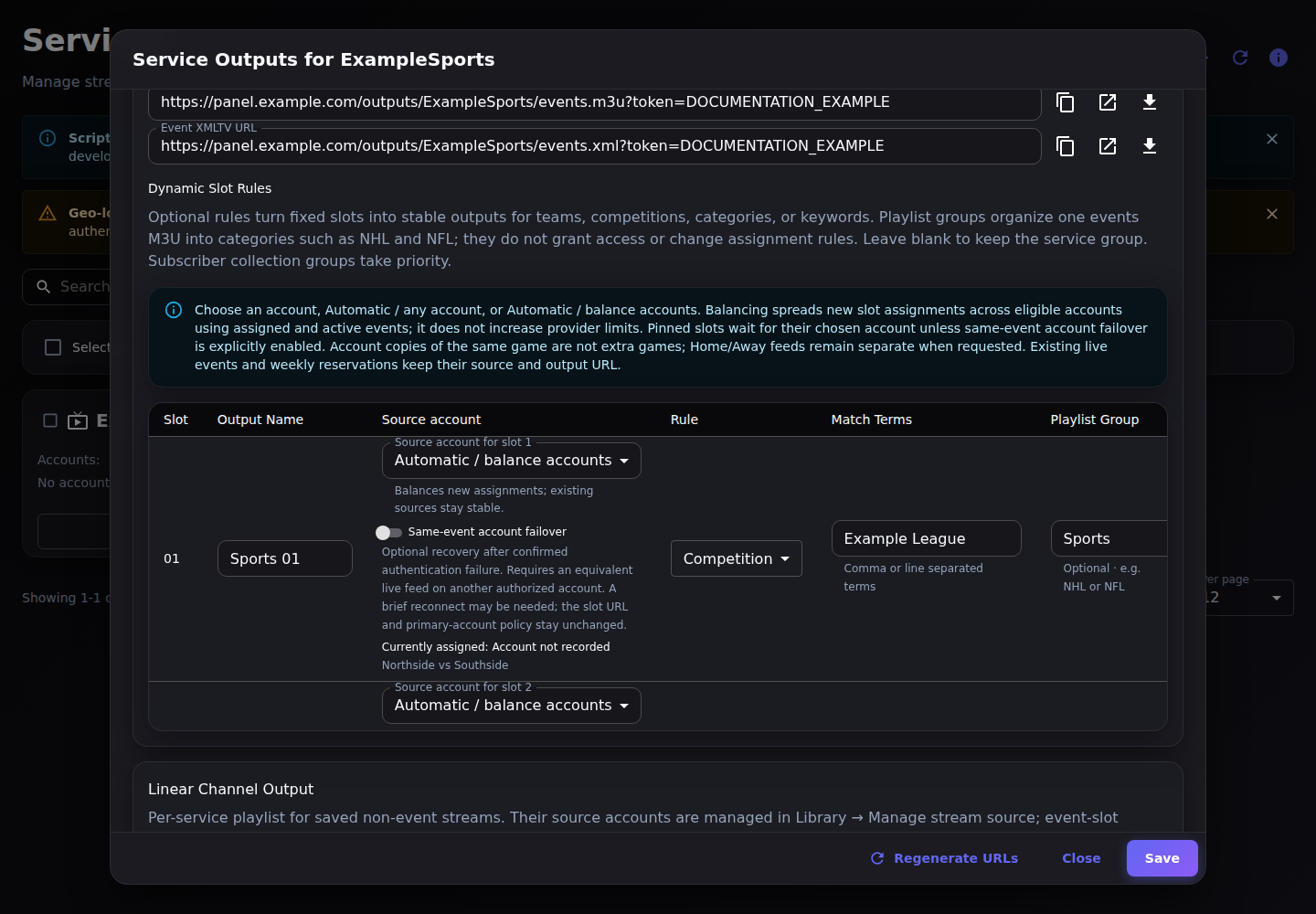
3. Understand every slot-row field
| Field | Use it for |
|---|---|
| Output Name | Your stable channel label. Static slot names can keep it unchanged while the assigned match changes. |
| Source account | Fixed account, Automatic / any account or Automatic / balance accounts. |
| Rule | Auto daily slot, Team, Competition, Category, Keyword or Regex. |
| Rule value | Terms from real catalogue metadata. Auto daily slot needs no value. Begin with Competition or Team rather than a broad keyword. |
| Playlist group | An M3U group-title such as NHL or NFL; it does not filter the catalogue or grant subscriber access. |
| Feed preference | Automatic / any, or a strict identified Home/Away/National/etc. role. |
| Priority | Higher rule priority allocates first; unnecessary differences can starve a lower-priority pool. Keep equivalent numbered pool rows consistent. |
| Same-event account failover | Optional conservative recovery for an already assigned compatible live event; not general account load balancing. |
Comma/newline terms are separate search terms. Avoid broad overlapping rules until you have inspected their matches. Regex is for experienced operators and does not create missing provider metadata.
4. One M3U with NHL and NFL groups
- Choose a total pool size suitable for the peak simultaneous games/feeds, for example 16 slots split into two pools of eight.
- Name slots 1–8 NHL 01…NHL 08. Set Rule to Competition, Rule value to the actual NHL competition name, and Playlist group to NHL on all eight.
- Name slots 9–16 NFL 01…NFL 08 and use the actual NFL competition and group NFL.
- Keep the rules, account policy, feed policy and priorities identical inside each pool unless you deliberately need different behavior.
- Leave duplicate rule matches off. Save and confirm NHL rows contain only NHL candidates and NFL rows only NFL candidates.
- Use the generated service events M3U: compatible players show the groups in one list.
For separate subscriber playlists, create separate collections/packages granting the intended slot pools and use their generated Access Line details. Do not invent an undocumented league filter on the operator playlist URL. Collections organize permissions; Playlist group only organizes labels.
5. Automatically map home, away and national feeds
- Set Broadcast mapping to Primary team & network TV feeds for ordinary identified team/network productions.
- Leave per-slot Feed preference at Automatic / any. You do not have to create a Home and Away rule for each match.
- Allocate enough slots for the distinct feeds you want. Eight simultaneous games can need sixteen outputs for home plus away, with capacity for any additional wanted national feeds.
- Use All available TV feeds only when you also want discovered special presentations. Use a strict per-row role only when a channel must wait for that exact role.
- Review pending feed discovery, unclassified games and unassigned broadcasts. A provider Automatic entry can remain a fallback until specific feed IDs are known.
6. Choose account pins or balancing
| Source account | Behavior |
|---|---|
| A named account | Uses only that account for new assignment. Unavailability does not silently turn the pin into Automatic. |
| Automatic / any account | Uses an eligible catalogue account without promising even distribution. |
| Automatic / balance accounts | Chooses among equivalent eligible account copies using assigned/active event load. Does not reshuffle ongoing games. |
Account copies of one identified broadcast are not extra games. Distinct Home/Away/network feeds can still be separate assignments. Leave deliberate duplicates disabled for unique numbered pools. Balancing concerns event assignments, not proxy bandwidth, all saved channels or an inferred provider quota. Each account still needs the appropriate content rights.
7. Optional same-event account recovery
Enable Same-event account failover only on slots where you want conservative cross-account recovery. It is off by default. The primary pin/balancing policy remains the policy for the next game.
- Requires fresh, repeated confirmed authentication/account/entitlement failure; a healthy current output wins over an old error.
- Requires another active permitted account with an equivalent live provider event, verified feed and language identity, and compatible output tracks.
- Does not treat a generic CDN 401/403, rate limit, timeout, DRM failure or missing catalogue entry as sufficient account-failure evidence.
- Runs from normal catalogue refresh/recovery observations, not instant or gapless switching. Some players must reconnect.
- Preserves the stable slot URL and has no automatic mid-game failback. It does not migrate independent UDP/RTMP/SRT outputs.
- Excludes on-demand runtimes, manual stops and unarmed empty slots. Review the current assigned account and last recovery attempt in the row.
8. Make eligible events start automatically
- Turn on Auto-start eligible upcoming events by default in Service Outputs and save.
- Enable Server Auto-Start on the Events page.
- Inspect the event’s armed state and slot assignment. With slots enabled, defaults arm assigned events—not every live item in the provider catalogue.
- Confirm the processing host, source routing, rights and capacity are ready. Start one available event and verify its generated slot URL.
- Check Logs and scheduler diagnostics for a missing automatic start; do not change every account or disable retry protections blindly.
On-demand startup and proactive auto-start serve different purposes. The default auto-start switch turns off conflicting on-demand mode. Explicitly armed individual events remain independent of slot-default arming.
9. Choose Rolling or week locking for recording
| Mode | Choose when | Important limit |
|---|---|---|
| Rolling schedule | You want nearer upcoming games first within a rule pool. | Future assignments can move when the catalogue changes. Playing/starting/recovering assignments stay fixed. |
| Lock for calendar week | A downstream recorder needs a more stable advance slot reservation. | Existing reservations stay through the ISO week; a later match may occupy an earlier slot number. Rule/count/enable changes can still invalidate a reservation. |
- Enable Include assigned events in subscriber XMLTV.
- Grant the desired slots and Events/XMLTV outputs through the subscriber’s collection/package.
- Copy the Access Line’s generated XMLTV URL into the recording client and refresh it.
- Verify the exact slot tvg-id, programme start/end and client time zone before scheduling.
- Keep the guide refreshed. Missing/estimated times or unpublished feed IDs cannot provide a trustworthy advance recording reservation.
Enabling XMLTV or multiple feeds does not force Rolling mode to lock. A static channel name also does not freeze which game owns that slot.
10. Verify and protect the outputs
| Output | What to copy/test |
|---|---|
| Event M3U | A list of the fixed slot channels; a compatible M3U player loads it. |
| Individual slot HLS | A fixed playback URL for one slot, which follows its assigned event. |
| Event XMLTV | Known programmes for mapped slots when enabled; subscriber rights still apply. |
| Access Line M3U/XMLTV | Subscriber-scoped credentials and entitlements, intended for subscribers. |
| xOTT Play | Use Access Line credentials; native event grants can work without fixed slots. |
Use generated links from the modal or Access Line. Do not share operator tokens publicly or replace them with captured provider manifests. Regenerate URLs invalidates older service links and can break downstream clients. A stable URL is not a zero-interruption guarantee.
When the result is not what you expected
| Symptom | Check first |
|---|---|
| Empty slot | Actual catalogue, horizon, rule/feed/account restrictions and capacity diagnostics. |
| Only Automatic feed | Whether the provider has published identified feeds; Primary diagnostics; protected live/week-locked fallback. |
| Same title twice | Distinct feeds versus account copies; feed labels; duplicate-rule setting. Do not merge by title alone. |
| Future game on channel 01 | Week locking, protected live rows and different rule/account pools; chronological order is not a global renumber of every slot. |
| Auto-start did not run | Server Auto-Start, arming, assignment, timing, account rights, routing, admission and logs. |
| Panel plays, M3U does not | Generated stable URL, output enabled, token, subscriber grants, actual fresh media and client cache. |
| Recording wrong game | Rolling reassignment or changed slot rules/count; current guide and recording-client cache. |