Connect
Add supported services, accounts, proxies, or manual sources through consistent, capability-aware controls.
Acquire authorized sources. Operate live channels and events. Build a VOD library, manage subscribers and deliver through your own workers—with xOTT Play included.
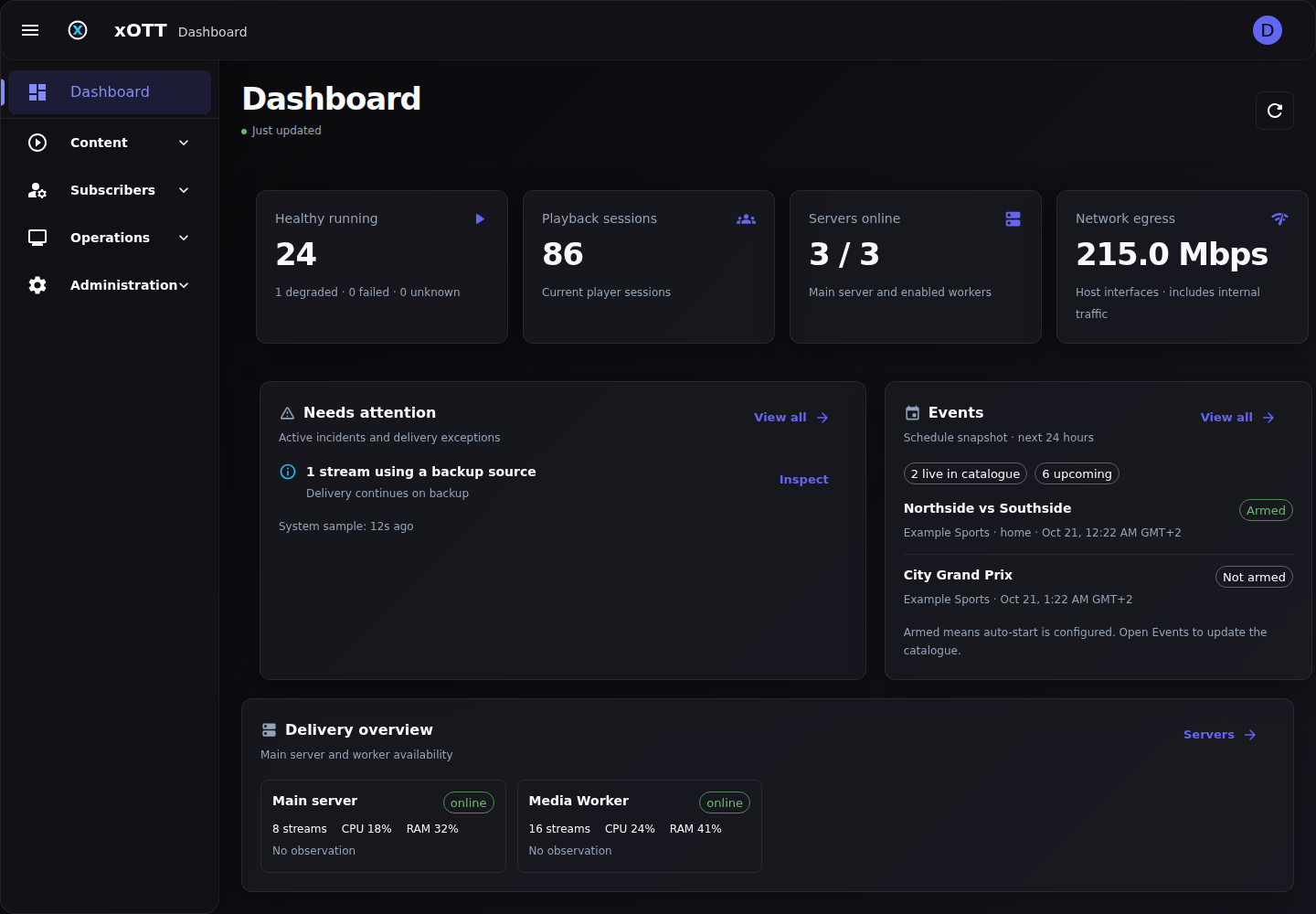
xOTT brings service access, stream processing, event automation, distribution, monitoring, and delivery together without taking control of your infrastructure.
Add supported services, accounts, proxies, or manual sources through consistent, capability-aware controls.
Start channels and events with automatic format selection, recovery rules, on-demand behavior, and load-balancer placement.
Publish stable, protected HLS and M3U outputs to viewers or an existing XUI delivery workflow.
Inspect stream health, active connections, CPU and memory use, playback progress, node placement, logs, and recovery state from one dashboard.
Source-checked guides and real React component illustrations explain what each control does—and what to verify before going live.
Save a channel, choose source qualities and languages, then preserve its identity as accounts change.
Stream operations →Collections and published packages control access through M3U, XMLTV, Xtream-compatible clients and xOTT Play.
Subscriber workflow →Inspect processing location, sessions, transport outputs and audio measurements without pretending missing telemetry is healthy.
Operational visibility →Live operations, subscriber access, published media and distributed delivery—without forcing every workflow into a separate panel.
Connect sources, save channels, publish packages and deliver authorized playback from one self-hosted platform.
How it works →A responsive browser player, versioned catalogue API, guide, favourites and continue watching—with access-line permissions.
How it works →Keep customers, access lines and resellers separate. Build collections, publish package versions and inspect active playback.
How it works →Download a film, season or series, import your own media and publish entitled movie/series catalogues.
How it works →Place live workloads deliberately and run VOD downloads directly on licensed workers with configurable storage folders.
How it works →Automate eligible events and stable slots, pin source accounts and classify supported home, away and national feeds.
How it works →Use UDP and continuous HTTP TS inputs, additional transport outputs, service metadata and scoped audio level control.
How it works →Select available renditions, resolution caps and language preferences. Compatible HLS/DASH outputs can carry multiple source qualities.
How it works →Keep a saved channel’s output identity while recovering through verified alternate inputs. Controlled switching, not a promise of zero interruption.
How it works →Import programme guides, inspect automatic matching, correct it manually and publish subscriber-specific playlists and guide data.
How it works →Freshness-aware dashboard, stream health, sessions, fleet telemetry, transport/audio measurements and retained diagnostics.
How it works →Guided Telegram setup for private chats, groups, channels and topics, with selected backend alert categories and delivery status.
How it works →Assign proxies and supported service-specific SmartDNS without replacing the server’s global network DNS.
How it works →Keep your downstream panel where you want it. Export stable outputs and inspect mappings, connection tests and synchronization logs.
How it works →Schedule recordings and use playback-triggered live starts where configured. Publish only the media your subscribers should see.
How it works →Capabilities vary by provider, source, client and license. Multi-quality uses available compatible source renditions; it does not create new encoded resolutions. Broadcast outputs require receiver validation.
Explore focused workflows for operators replacing fragmented scripts, overloaded origin servers, and manual channel maintenance.
Centralize service accounts, channels, VOD, events, output URLs, monitoring and access policies in a self-hosted operations panel.
Explore OTT managementDistribute stream processing across healthy workers with placement policies, node telemetry, fallback and stable public outputs.
Explore load balancingPublish stable, token-protected live-channel and event outputs into an existing XUI workflow without rebuilding your delivery stack.
Explore XUI deliveryTrack stream health, logs and worker capacity, then apply automated restart and recovery controls when sources fail.
Explore stream monitoringSupported SmartDNS is service-specific. Proxy routing, processing placement and public media delivery remain separate controls; no global resolver change is required.
Routing explained →Track preferences select real source renditions. Output containers and receiving clients determine which qualities, languages and subtitles are usable.
Track selection explained →Freshness-aware telemetry distinguishes unknown values from zero. Audio correction and source switching require validation against the content and receivers you actually operate.
Verification explained →Instead of combining unrelated scripts, process managers, proxy tools, monitoring pages, and playlist generators, operate the complete workflow from one maintained system.
A maintained catalog spanning major and regional providers. Available actions vary by provider, account, territory, and subscription; xOTT detects supported capabilities in the panel.
Main-panel licenses include the complete management platform. Each Load Balancer is licensed separately at exactly half the corresponding panel price.
Test the full engine with your own setup before committing
Panel and Load Balancer trials are free
Perfect for professional streaming operations starting out
Load Balancer Monthly: $25 / month
Best value for long-term professional operations
Load Balancer Annual: $225 / year
All payments processed securely through cryptocurrency payment system
Renew or restore any non-lifetime license from your account dashboard
Technical help through the published Telegram and email channels
Read each release in context, then use current guides for configuration.
Security patches and dependency maintenance. Improved streaming stability and playback compatibility.…
Major release introducing optional media processing, expanded DRM management and consistent VOD storage. Added optional CPU and compatible hardware transcoding for streams and VOD downloads, with original/copy mode retained as the default.…
Improved Disney+ TV pairing with a ready activation listener, reliable account completion and region-aware connections. Refined Disney+ catalogue browsing, pagination, profile handling and session refresh.…
Nineteen focused guides, practical recipes, real UI renders and searchable documentation—reviewed against v2.0.1.
xOTT Panel is self-hosted stream management software for operators handling authorized live TV, VOD and event sources. It combines service adapters, stream operations, monitoring, worker nodes, protected outputs and integrations in one dashboard.
Yes. Worker-node load balancing can place stream workloads according to node health, CPU, memory, active streams, groups and operator-defined policies while the main server remains the controller and public output endpoint.
Yes. xOTT can publish stable live-channel and event outputs into an XUI-based delivery workflow, with configurable synchronization and protected output URLs.
xOTT handles HLS, DASH, UDP and continuous HTTP MPEG-TS inputs, with HLS and configurable additional outputs. Available tracks, DRM handling and playback behavior depend on the configured source and the operator's authorization.
Yes. Customers are responsible for ensuring they have the rights and permissions required to access, process and distribute every configured source.
Have questions? Need support? We're here to help you succeed with xOTT Panel.
The free one-day trial includes the complete panel so you can validate your services, streams, outputs, and infrastructure before choosing a longer plan.
Use xOTT only with content you are authorized to access and distribute.